
Generate Accurate Citations in Seconds


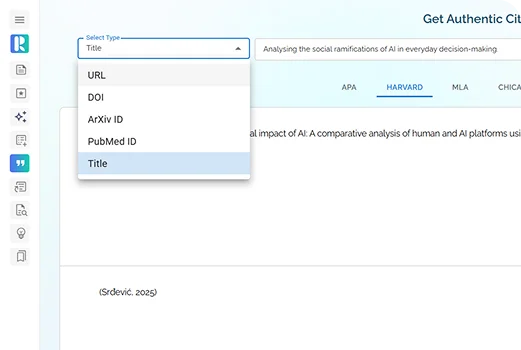
Supported input options include:
- Paper Title
- DOI
- URL
- ArXiv ID
- PubMed ID
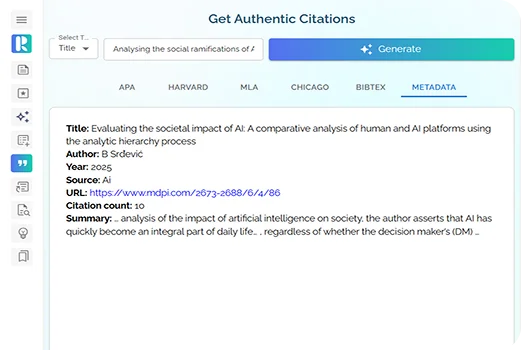
Supported formats include:
- APA
- Harvard
- MLA
- Chicago
- BibTeX
- Metadata View
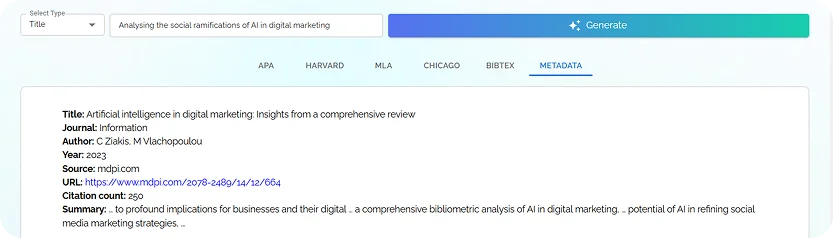
Citation Generator provides:
formats
Research More Confidently With an AI Research Assistant
Generating a citation solves the formatting problem, but researchers often have another question: How does this source actually fit into my research?
ResearchPal's AI Research Assistant complements the Citation Generator by helping you investigate sources before and after you cite them. You can explore the paper's ideas, clarify terminology, understand findings, and discuss how evidence relates to your research question.
ResearchPal's Citation Generator supports APA, Harvard, MLA, Chicago, BibTeX and metadata views, and can generate references from inputs such as URLs, DOIs, titles and research identifiers.
Combine Citation Generation With Research Assistance
The AI Research Assistant can help you:
- Understand a source before adding it to your references
- Explore how evidence supports your research
- Clarify academic terminology
- Discuss findings and research contributions
- Identify questions raised by a source
- Decide whether a paper is relevant to your research
- Move from citation creation to deeper source analysis
This creates a more useful workflow than treating citations as isolated formatting tasks:
Discover → Understand → Evaluate → Cite → Write
If you're searching for a best AI research assistant that fits naturally into your citation workflow, explore ResearchPal's AI Agent.
Try the AI Research AssistantExplore More Features
Discover the rest of ResearchPal's AI-powered research and writing tools.
Literature Review
Generate structured literature reviews by simply entering your research topic or question. ResearchPal searches across millions of academic papers, synthesizes findings, and produces citation-backed content ready for your research workflow.

Generate Review
Search Papers
Discover relevant research papers using intelligent, domain-specific search across millions of academic sources. Save papers, explore citations and references, and build your research foundation faster.
Discover Papers
Claim Check
Check whether published research supports a claim, refutes it, or shows mixed findings. Each evidence card shows the exact sentence behind its label, and retracted papers are flagged separately.
Check a Claim
Connected Papers
Explore how research papers connect through citations, references, and shared topics using an interactive visual graph for deeper discovery. Navigate research relationships, uncover trends, and find relevant papers faster.
Explore Graph
Chat With PDF
Upload or import PDFs and interact with research papers using AI. Ask questions, extract insights, and explore content faster with context-aware responses.
Start Chatting
Analyze & Remix Within PDF Chat
Screenshot any figure or visual from your PDF and let ResearchPal analyze, explain, and redesign it into clean, high-quality visuals using AI. Turn research visuals into presentation-ready graphics in seconds.
Analyze Visuals
Paper Insights
Analyze research papers and extract key information such as methodology, findings, limitations, and contributions. Compare multiple papers and generate structured insights to accelerate your understanding.
Extract Insights
Citation Management
Store, manage, and format all your citations in one place. Automatically save citations from essays, literature reviews, uploads, and citation generation.
Manage Citations
AI-Powered Editor Tools
Enhance your writing directly inside the document editor with context-aware AI tools designed for academic writing.
Enhance Writing
Paraphraser & Writing Enhancer
Improve your academic writing with AI-powered editing tools including paraphrasing, summarization, tone adjustment, and translation.
Refine Text
Research Library & Integrations
Upload, organize, and import research papers from multiple sources including Zotero and Mendeley. Access files, extract insights, and manage your research in one centralized library.
Organize Library
Essay Writing
Generate structured essays with headings, citations, and customizable formats. Define topic, essay type, and length to instantly create well-structured academic content.
Write Essay
